
MetaMask is a popular cryptocurrency wallet that allows you to interact seamlessly with the Ethereum blockchain and its myriad of decentralized applications (DApps). As a browser extension or mobile application, it serves as a bridge between your web browser and the Ethereum network, enabling you to manage your digital assets, including Ether and various tokens, all in one place. The wallet is designed to be user-friendly, making it accessible for both beginners and seasoned crypto enthusiasts.
By using MetaMask, you can easily send and receive cryptocurrencies, participate in token sales, and engage with DApps without needing to run a full Ethereum node. One of the primary reasons to use MetaMask is its convenience. With just a few clicks, you can access a wide range of services within the Ethereum ecosystem.
Whether you want to trade tokens on decentralized exchanges, lend your assets for interest, or explore the world of non-fungible tokens (NFTs), MetaMask provides a straightforward interface that simplifies these processes. Additionally, the wallet prioritizes security by allowing you to control your private keys, ensuring that you have full ownership of your assets. This combination of ease of use and security makes MetaMask an essential tool for anyone looking to navigate the world of cryptocurrencies.
Key Takeaways
- MetaMask is a browser extension that allows users to interact with the Ethereum blockchain and its decentralized applications.
- Setting up MetaMask is a simple process that involves installing the extension, creating a wallet, and securing it with a strong password and backup phrase.
- MetaMask allows users to manage multiple wallets and accounts, each with its own unique Ethereum address.
- Sending and receiving Ethereum with MetaMask is as easy as entering the recipient’s address and specifying the amount to be transferred.
- MetaMask enables users to explore a wide range of decentralized applications (DApps) that are built on the Ethereum blockchain, offering various functionalities such as finance, gaming, and social networking.
Setting Up MetaMask: A Step-by-Step Guide
Setting up MetaMask is a straightforward process that can be completed in just a few minutes. To begin, you need to download the MetaMask extension for your preferred web browser, such as Chrome, Firefox, or Brave. Once installed, you will see the MetaMask fox icon in your browser’s toolbar.
Click on the icon to launch the application and start the setup process. You will be greeted with an introduction screen that explains what MetaMask is and how it works. After reading through this information, click on the “Get Started” button to proceed.
The next step involves creating a new wallet. You will be prompted to create a strong password that will protect your wallet from unauthorized access. Make sure to choose a password that is both secure and memorable.
After setting your password, you will be given a seed phrase—a series of 12 words that serve as a backup for your wallet. It is crucial to write down this seed phrase and store it in a safe place, as it is the only way to recover your wallet if you forget your password or lose access to your device. Once you confirm that you have saved your seed phrase, your MetaMask wallet will be ready for use.
Understanding Wallets and Accounts in MetaMask
In MetaMask, wallets and accounts are fundamental concepts that help you manage your digital assets effectively. When you create a MetaMask wallet, you essentially create a unique address on the Ethereum blockchain where your cryptocurrencies can be stored. This wallet can hold multiple accounts, each with its own unique address.
This structure allows you to organize your assets better and manage different projects or investments separately. Each account within your MetaMask wallet can be used for various transactions, such as sending or receiving Ethereum and tokens. You can easily switch between accounts by clicking on the account name at the top of the MetaMask interface.
This feature is particularly useful if you want to keep your personal and business transactions separate or if you’re experimenting with different DApps without mixing funds. Understanding how wallets and accounts work in MetaMask will empower you to take full advantage of its capabilities while maintaining control over your assets.
How to Send and Receive Ethereum with MetaMask
Sending and receiving Ethereum using MetaMask is a simple process that can be completed in just a few steps. To send Ethereum, start by clicking on the “Send” button within the MetaMask interface. You will then be prompted to enter the recipient’s wallet address and the amount of Ether you wish to send.
It’s essential to double-check the recipient’s address before confirming the transaction, as sending funds to an incorrect address can result in permanent loss of your assets. Once you’ve entered the necessary information, click “Next” to review the transaction details. Here, you’ll see the gas fee associated with the transaction—this fee compensates miners for processing your transaction on the Ethereum network.
You can adjust the gas fee based on how quickly you want the transaction to be confirmed; higher fees typically result in faster confirmations. After reviewing everything, click “Confirm” to complete the transaction. You will receive a notification once the transaction has been processed successfully.
Receiving Ethereum is equally straightforward. To do this, click on the “Account” name at the top of the MetaMask interface to copy your wallet address. You can then share this address with anyone who wants to send you Ether.
Alternatively, if you’re using a DApp that requires payment, simply connect your MetaMask wallet, and it will automatically use your wallet address for transactions.
Exploring Decentralized Applications (DApps) with MetaMask
One of the most exciting features of MetaMask is its ability to connect with decentralized applications (DApps) built on the Ethereum blockchain. DApps are applications that run on a peer-to-peer network rather than being hosted on centralized servers, offering users greater control over their data and interactions. With MetaMask, you can easily access a wide range of DApps—from decentralized finance (DeFi) platforms to NFT marketplaces—right from your browser.
To explore DApps using MetaMask, simply navigate to a DApp website while logged into your wallet. Most DApps will prompt you to connect your MetaMask wallet when you first visit their site. Once connected, you’ll be able to interact with the DApp’s features seamlessly.
For instance, if you’re using a DeFi platform like Uniswap or Aave, you can trade tokens or lend assets directly from your MetaMask wallet without needing to create separate accounts or provide extensive personal information. As you explore various DApps, it’s essential to do your research and ensure that you’re interacting with reputable platforms. The decentralized nature of these applications means that they may not have the same level of oversight as traditional services, so exercising caution is crucial.
Navigating the Ethereum Ecosystem with MetaMask
MetaMask serves as an essential tool for navigating the vast Ethereum ecosystem. With its user-friendly interface and robust features, it allows you to engage with various aspects of blockchain technology effortlessly. From trading cryptocurrencies on decentralized exchanges to participating in Initial Coin Offerings (ICOs), MetaMask provides access to numerous opportunities within this dynamic landscape.
As you delve deeper into the Ethereum ecosystem, you’ll discover various projects and communities that align with your interests. Whether you’re interested in gaming, finance, or art, there’s likely a DApp or project that caters to your needs. By using MetaMask as your gateway, you can explore these projects while keeping all your assets securely managed in one place.
Moreover, as new developments emerge within the Ethereum network—such as upgrades or new token standards—MetaMask often updates its features accordingly. This adaptability ensures that you’re always equipped with the latest tools needed to navigate this ever-evolving ecosystem effectively.
Security Best Practices for Using MetaMask
While MetaMask offers robust security features, it’s essential to adopt best practices to protect your assets further. First and foremost, always ensure that you’re downloading MetaMask from official sources—either from their website or trusted browser extension stores—to avoid phishing scams or malicious software. Additionally, regularly update your browser and MetaMask extension to benefit from security patches and improvements.
Another critical aspect of security is safeguarding your seed phrase and private keys. Never share these sensitive pieces of information with anyone or store them digitally in unsecured locations. Instead, write them down on paper and keep them in a safe place where only you can access them.
If someone gains access to your seed phrase or private keys, they can control your wallet and potentially steal your assets. Lastly, consider enabling additional security measures such as two-factor authentication (2FA) on any associated accounts or services that support it. While 2FA may not be directly applicable within MetaMask itself, it can enhance security for exchanges or platforms where you may transfer funds.
Managing Tokens and NFTs with MetaMask
MetaMask not only allows you to manage Ether but also supports various ERC-20 tokens and non-fungible tokens (NFTs). To add tokens to your wallet, simply click on “Assets” within the MetaMask interface and select “Add Token.” You can either search for popular tokens by name or enter their contract address manually if they are not listed automatically. Once added, you’ll be able to view your token balances alongside Ether in your wallet.
This feature makes it easy to keep track of all your digital assets in one place without needing multiple wallets or accounts. Additionally, managing NFTs through MetaMask is straightforward; simply connect with NFT marketplaces like OpenSea or Rarible using your wallet. When buying or selling NFTs, ensure that you’re aware of gas fees associated with transactions on the Ethereum network.
These fees can vary significantly based on network congestion and transaction complexity; therefore, it’s wise to monitor gas prices before executing trades.
Connecting MetaMask to Hardware Wallets
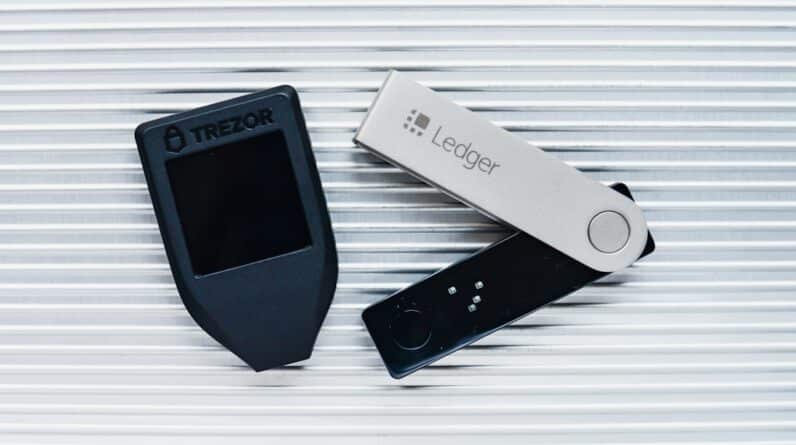
For those seeking an extra layer of security for their digital assets, connecting MetaMask to a hardware wallet is an excellent option. Hardware wallets are physical devices designed specifically for securely storing cryptocurrencies offline, making them less vulnerable to hacking attempts compared to software wallets like MetaMask alone. To connect a hardware wallet such as Ledger or Trezor with MetaMask, start by ensuring that your hardware wallet is set up correctly and connected to your computer via USOpen MetaMask and click on your account icon at the top right corner; then select “Connect Hardware Wallet.” Follow the prompts provided by MetaMask to complete the connection process.
Once connected successfully, you’ll be able to manage both your hardware wallet’s assets alongside those stored in your MetaMask wallet seamlessly. This integration allows you to enjoy the convenience of using DApps while keeping most of your funds securely stored offline.
Troubleshooting Common Issues with MetaMask
While using MetaMask is generally smooth sailing, you may encounter some common issues along the way. One frequent problem users face is difficulty connecting their wallets to DApps or experiencing slow transaction confirmations due to network congestion. If you’re having trouble connecting with a specific DApp, try refreshing the page or disconnecting and reconnecting your wallet.
Another common issue involves gas fees; sometimes they may appear higher than expected due to fluctuations in network demand. If you’re facing high fees when trying to send transactions or interact with DApps, consider waiting for lower traffic times or adjusting gas settings manually within MetaMask before confirming transactions. If you’re experiencing technical difficulties beyond these common issues—such as problems logging into your account—consulting official support channels or community forums can provide valuable insights into resolving more complex problems effectively.
Tips and Tricks for Getting the Most out of MetaMask
To maximize your experience with MetaMask, consider implementing some helpful tips and tricks that can enhance usability and efficiency. First off, familiarize yourself with keyboard shortcuts available within the extension; these shortcuts can save time when navigating between accounts or accessing specific features quickly. Additionally, take advantage of custom networks available within MetaMask; this feature allows users access not only Ethereum mainnet but also testnets like Ropsten or Rinkeby for experimenting without risking real funds during development phases.
Lastly—stay informed about updates from both MetaMask developers as well as broader trends within cryptocurrency markets; being proactive about learning will empower you further as an informed user navigating this exciting digital landscape!
FAQs
What is MetaMask?
MetaMask is a cryptocurrency wallet and browser extension that allows users to interact with the Ethereum blockchain. It enables users to store and manage their Ethereum and other ERC-20 tokens, as well as to access decentralized applications (dApps) on the Ethereum network.
How do I install MetaMask?
To install MetaMask, you can visit the official MetaMask website or search for the MetaMask extension in your browser’s extension store. Once you find it, you can add it to your browser and follow the on-screen instructions to set up your wallet.
How do I create an account on MetaMask?
After installing the MetaMask extension, you can create a new account by clicking on the MetaMask icon in your browser and following the prompts to set up a new wallet. This typically involves creating a password and securing a unique 12-word seed phrase.
How do I use MetaMask to interact with dApps?
Once your MetaMask wallet is set up, you can use it to interact with dApps by simply clicking on the MetaMask icon in your browser and connecting your wallet to the dApp. This allows you to make transactions, access decentralized finance (DeFi) platforms, and participate in other Ethereum-based activities.
Is MetaMask safe to use?
MetaMask is considered to be a secure wallet, but it’s important to follow best practices for securing your account, such as keeping your seed phrase private and enabling two-factor authentication. Additionally, only use the official MetaMask website or trusted sources to download the extension.